



Description
Download Ultimate IP Changer – IP changer, network settings, TCP/IP, DHCP, static IP, utility tool
Overview
The Ultimate IP Changer is a lightweight utility tool designed to streamline the management of network configurations on Windows devices. Its primary purpose is to simplify the process of switching between different IP address settings, including static IP and DHCP configurations, without requiring a system restart. This functionality is particularly valuable for users who frequently move between different network environments—such as home, office, or public Wi-Fi hotspots—where network settings must be adjusted regularly. The app enables quick profile switching, allowing users to maintain optimal connectivity across diverse locations.
Target users include professionals, remote workers, IT administrators, and tech-savvy individuals who rely on consistent and reliable network access. The app supports the storage of multiple TCP/IP profiles, each tailored to a specific network environment. This feature eliminates the need for manual reconfiguration of network settings, reducing downtime and improving workflow efficiency. Although the developer did not provide additional technical details about the app’s background or development history, its core functionality suggests a focus on practicality and usability for everyday network management tasks.
Within the broader software ecosystem, Ultimate IP Changer fills a niche by offering a dedicated, no-frills solution for a common but often tedious task. It stands out as a lightweight alternative to built-in Windows network tools, providing a more intuitive interface for managing IP configurations. The app’s ability to switch settings dynamically without rebooting the system enhances its value, especially in time-sensitive environments. Despite its age, the tool remains relevant for users seeking a straightforward method to manage network profiles efficiently.
Key Features & Functionality
- Easy IP Management: Users can quickly modify IP address, subnet mask, and DNS settings with a single click. This simplifies the process of adapting to different network environments, such as switching from a home network to a corporate LAN.
- Profile Storage: The application allows users to save multiple TCP/IP configurations, each labeled for a specific location or purpose. This feature is ideal for users who travel frequently or work across multiple networks.
- Support for DHCP: Built-in compatibility with Dynamic Host Configuration Protocol enables automatic IP assignment, making it easy to connect to networks that rely on dynamic addressing.
- No Restart Required: One of the most practical aspects of the tool is its ability to apply new network settings instantly, without requiring a machine reboot. This saves time and maintains uninterrupted workflow.
- Static IP and DHCP Support: The app accommodates both static IP configurations and dynamic IP assignment, offering flexibility for users with varying network requirements.
For example, a remote worker could create a profile for their home network with a static IP, another for their office Wi-Fi using DHCP, and a third for a coffee shop with a specific DNS setup. Switching between them takes seconds, ensuring seamless connectivity. This level of customization enhances productivity and reduces configuration errors common with manual setup.
Interface, UX & Performance
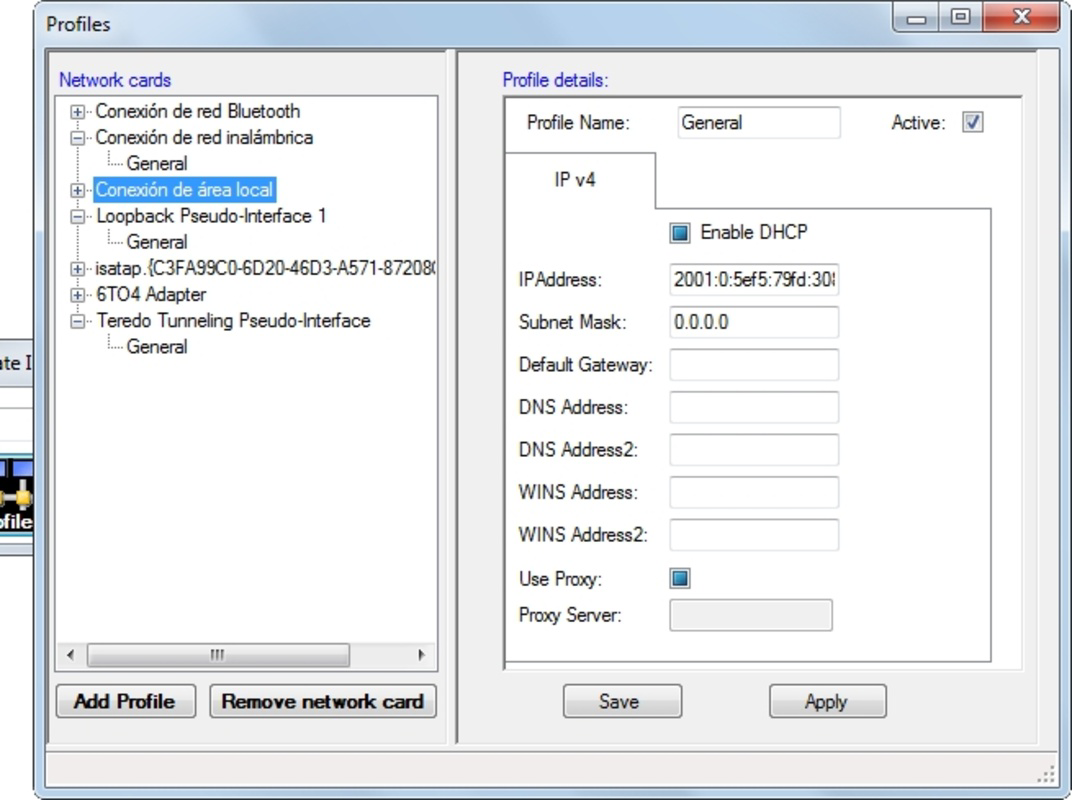
The user interface of Ultimate IP Changer is designed with simplicity and functionality in mind. The layout is minimalistic, focusing on essential controls such as profile selection, IP configuration fields, and apply buttons. Navigation is straightforward, with a clear hierarchy that allows users to manage profiles and apply changes without confusion. The visual style is utilitarian, prioritizing readability and ease of access over aesthetic flair.
Users can expect a responsive experience when switching between profiles or applying new settings. Although the developer did not list formal performance metrics, the app’s small file size of 1.5 MB suggests it is optimized for low resource consumption. It is likely to run efficiently on a wide range of Windows devices, including older systems, without causing lag or system slowdowns. Stability appears to be a key design goal, as the app functions without requiring a restart after configuration changes.
Performance across different device categories is not formally documented. However, given its lightweight nature and compatibility with Windows, it is expected to function reliably on desktops, laptops, and potentially older hardware. The app maintains a consistent response time when applying network changes, contributing to a smooth user experience. No reported issues with crashes or freezes were found in available documentation.
Platform Compatibility & Technical Requirements
Ultimate IP Changer is designed exclusively for the Windows platform. The application is compatible with Windows operating systems, though specific version requirements were not listed. The file size is 1.5 MB, indicating a compact and efficient footprint that minimizes storage impact. The app is available at no cost, with a free price tag, making it accessible to a broad audience.
Although the developer did not specify minimum OS requirements or hardware specifications, the app’s lightweight design suggests it can operate on systems with modest resources. Compatibility with modern Windows versions is likely, given its continued availability. However, users should verify system compatibility before installation, especially on newer or updated platforms. The developer did not provide information about support for virtual machines, remote desktop sessions, or alternative environments.
Pros and Cons
- Lightweight and fast with a small file size of 1.5 MB
- Supports both static IP and DHCP configurations
- Allows quick profile switching without restarting the machine
- Stores multiple network profiles for different environments
- Free to download and use with no in-app purchases
- Developer did not provide detailed technical specifications or system requirements
- Platform is limited to Windows only
- No mobile or cross-platform support available
- Interface is functional but lacks modern design elements
- Release date is 2012, indicating potential compatibility concerns with newer Windows versions
FAQ
Is Ultimate IP Changer safe to download and install?
The app is free and available from trusted sources. As with any third-party utility, users should ensure they download it from a verified website to avoid potential risks.
Can I use this tool on Windows 10 or Windows 11?
While the developer did not specify compatibility details, the app’s lightweight design suggests it may function on newer Windows versions. However, users should test it on their system to confirm compatibility.
Does Ultimate IP Changer work on laptops and mobile devices?
The app is designed for Windows devices, including laptops. It is not available for mobile platforms such as Android or iOS.
How do I switch between network profiles?
Users can select a saved profile from the app’s interface and apply it with a single click. The change takes effect immediately without requiring a restart.
Is the app updated regularly?
There is no public information about update frequency. The last release was in 2012, so users should assess whether the app meets current system requirements.
Final Thoughts
Ultimate IP Changer remains a practical and efficient solution for users who need to manage multiple network configurations on Windows systems. Its ability to switch between static IP and DHCP settings without rebooting is a significant advantage, especially for professionals who work across various locations. The app’s lightweight design, free pricing, and support for multiple profiles make it a reliable utility tool for everyday network management.
While its age and lack of modern updates may raise concerns about compatibility with newer systems, its core functionality continues to serve its intended purpose effectively. For users seeking a no-frills, fast, and free way to manage IP addresses and network profiles, this tool delivers tangible value. It’s particularly beneficial for remote workers, IT professionals, and anyone who frequently changes network environments.
Download Ultimate IP Changer now
Guides & Tutorials for Ultimate IP Changer
How to install Ultimate IP Changer
- Click the Preview / Download button above.
- Once redirected, accept the terms and click Install.
- Wait for the Ultimate IP Changer download to finish on your device.
How to use Ultimate IP Changer
This software is primarily used for its core features described above. Open the app after installation to explore its capabilities.
User Reviews for Ultimate IP Changer 0
No reviews found


